Add to Microsoft Intune: Admin Mode can now upload an app straight to your Microsoft Intune tenant, no need to download a package and create the app in Intune yourself. Just open Admin Mode, select an app, and choose Upload next to Microsoft Intune. The first time, an administrator grants a one-time consent so App Catalog can manage apps in your tenant; after that, every upload is a single click. As with the Package deployment tool, the uploaded package isn't the app itself, it runs the Catalog Agent to install the app, so it always stays up to date from App Catalog.
Update from the notification: Clicking Update now on an update reminder now installs the updates right away in the background, instead of opening the Catalog App. It's a faster, less disruptive way to stay up to date. Tapping the notification itself still opens the Catalog App on the Updates section, so users who want to review or update granularly can still do so.
New command syntax: The Catalog Agent now uses clear subcommands, for example catalog install nl.root3.support, catalog update and catalog uninstall nl.root3.support. Behind the scenes we've migrated to Swift Argument Parser for more robust, reliable argument parsing and built in help functions.
Run catalog help or catalog help SUBCOMMAND to view all available options.
Your existing scripts and MDM policies keep working unchanged, the familiar dash-style commands (catalog --install, catalog -u, catalog --update) will continue to work.
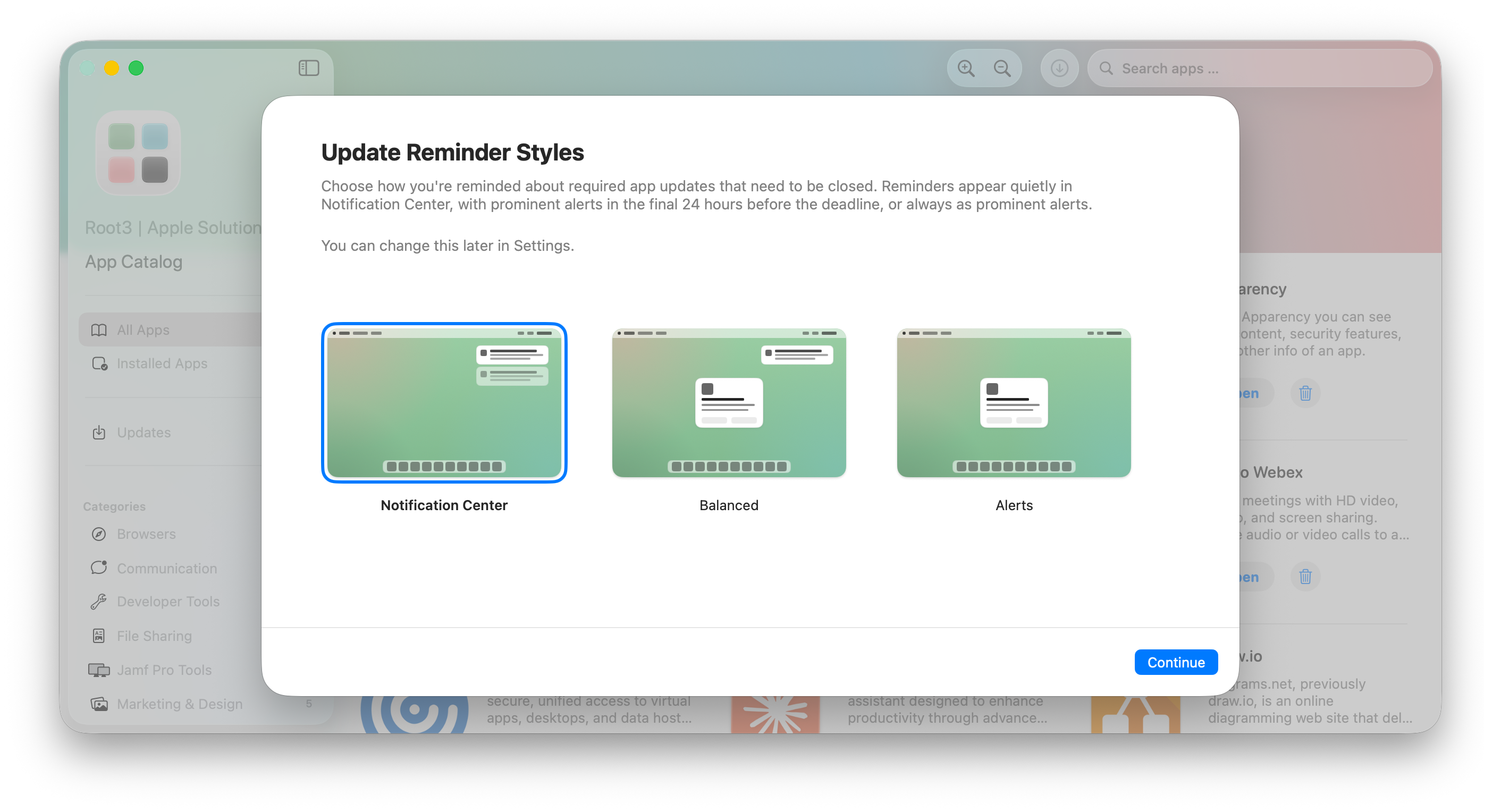
Update Reminder Styles:App Catalog now offers three styles to remind you about required app updates that need their app to be closed:
Notification Center (default): Reminders appear in Notification Center, like a regular notification. They respect Do Not Disturb and Focus, so they won't break your concentration. Best if you want updates to wait their turn and less interruption for your workflows.
Balanced: Reminders stay in Notification Center until the deadline gets close. In the final 24 hours before the deadline, they switch to a prominent alert in the middle of the screen so you don't miss it. A good middle ground.
Alerts: Every reminder appears as a prominent alert in the middle of the screen. The most visible option, and the one most likely to interrupt what you're doing. Best if you'd rather act on updates straight away.
Allow users to choose or define an organization-wide policy:
By default, users will be able to choose the update reminder style that best fits their workflow. Choice will be offered when they open Catalog App and can be changed later in the app settings. We believe every person has its own way of working and being productive. That’s why we recommend letting people choose.
If required, administrators can enforce a single style organization-wide via the UpdateNotificationStyle preference. The user will not be prompted to choose and the setting cannot be altered.
Reminder lifecycle logs are retained in Unified Logging and now include the presentation style (Alert or Notification Center) and reminder type for easier diagnostics.
🛠 Fixed
Notification Center action button labels are localized with English fallback: The "Update now" and "Later" buttons under the notification (Notification Center actions) previously fell back to localized string (UPDATE_NOW) in non-supported languages. They now fallback to English.
All-new user interaction: We are introducing a completely new way how users interact with apps requiring a restart to update, designed to strike the right balance between informing users while still respecting the user’s productivity. Previously, a large popup in the center of the screen would ask the user to close the app and update. Now, App Catalog fully relies on the macOS Notification Center for the best possible Apple experience, similarly to what users already know from macOS updates. When App Catalog requires user interaction, the update is automatically deferred and a notification will be sent informing the user and ask to update at a more convenient time. Ultimately, the update will be enforced to make sure your organization stays up to date and compliant. Here are some highlights:
Increasing notification frequency: If the user doesn’t update, reminder notifications will be sent and get more frequent leading up to the enforcement date
Notification actions: Clicking on the notification brings the user directly to the Updates section in the Catalog App, allowing them to update immediately and granularly at the most convenient time.
Notification grouping: To limit the number of notifications and avoid clutter, App Catalog groups updates logically in one notification.
Respect Do Not Disturb and Focus: Apps requiring user interaction respect the user’s Focus state, such as Do Not Disturb.
Automatic dismissal of notifications: When reminders are no longer relevant, App Catalog automatically dismisses them without requiring users to dismiss notifications that are no longer relevant.
Custom deferral time: Use AllowedDeferralsInDays to configure a different number of days the user gets to update manually before enforcing the update.
More information:
Action Required: Update MDM Configuration for App Catalog: We previously informed you about the upcoming update, allowing you to make the necessary changes in your Device Management Service. Please review if you haven’t yet implemented it.
Granting User Notifications: Technical specification about configuring notifications for App Catalog for the best possible experience.
Hourly updates: App Catalog now checks every hour for updates instead of once every day or less often. This makes sure updates are timely installed. You can use
deferrals and delays to control when updates can be applied or must be enforced.
UI improvements: Catalog App has some UI updates such as simplified buttons (avoid glass on glass), enhanced animation with the app icon and more.
👀 Changed
App Catalog 1.9.0
Key UpdateDeferrals is removed. A new key AllowedDeferralsInDays allows organizations to set a different time-based deferral.
Key DisableAppInstalls is deprecated. When still applied, the same behavior as UpdatesOnly is applied and Catalog App only shows available updates. This means Catalog App can no longer be completely disabled, as the app is now the central place for users to update apps manually.
Version reliability improvements: We have improved the way App Catalog is informed about the latest version of an app.
🛠 Fixed
General
Fixed code signature errors after force-installing app updates or when updating apps using Support App: In some cases, force-installing an app update or updating an app through Support App could leave behind files from the previous version inside the app bundle. When this happened, macOS reported the app's code signature as invalid (for example, with the message "File added after outer app bundle was codesigned"), which could prevent the app from launching or passing Gatekeeper checks. Users may have experienced this as the app unexpectedly quitting right after opening, or as a macOS warning that the app is "damaged" and can't be opened. Updates now fully replace the app bundle, ensuring the code signature remains intact after every update. We apologize for any inconvenience you and your users may have experienced.
Workaround for affected installs: Run the following command through your Device Management Solution to remotely repair the app without asking the user to reinstall it manually:
Copy code
catalog -i BUNDLE_ID --force
If you've made the app available in the Catalog App, users can also resolve it themselves by uninstalling and reinstalling the app from there.